
Live Log Insight
An intelligent agent skills system that analyzes logs, detects anomalies, and produces actionable insights — using composable skills, not monolithic prompts.Powered By























































What is Live Log Insight?
Live Log Insight is a modular Agent Skills system designed for automated log analysis. It orchestrates specialized skills to transform raw logs into meaningful insights for operators and developers. Unlike traditional monitoring tools, it uses an AI-powered pipeline that can understand context, detect anomalies, and suggest actions.Key Features
- 🔍 Automated Discovery: Automatically identifies log sources across environments
- 📊 Intelligent Parsing: Normalizes diverse log formats into structured events
- 📈 Pattern Recognition: Aggregates logs to identify trends and metrics
- 🚨 Anomaly Detection: Detects spikes, new errors, and unusual behavior
- 💡 Root Cause Analysis: Generates plausible hypotheses for detected issues
- 📝 Actionable Summaries: Produces clear, human-readable reports
- ✅ Smart Recommendations: Suggests concrete next steps for operators
Architecture
The system follows a sequential pipeline workflow: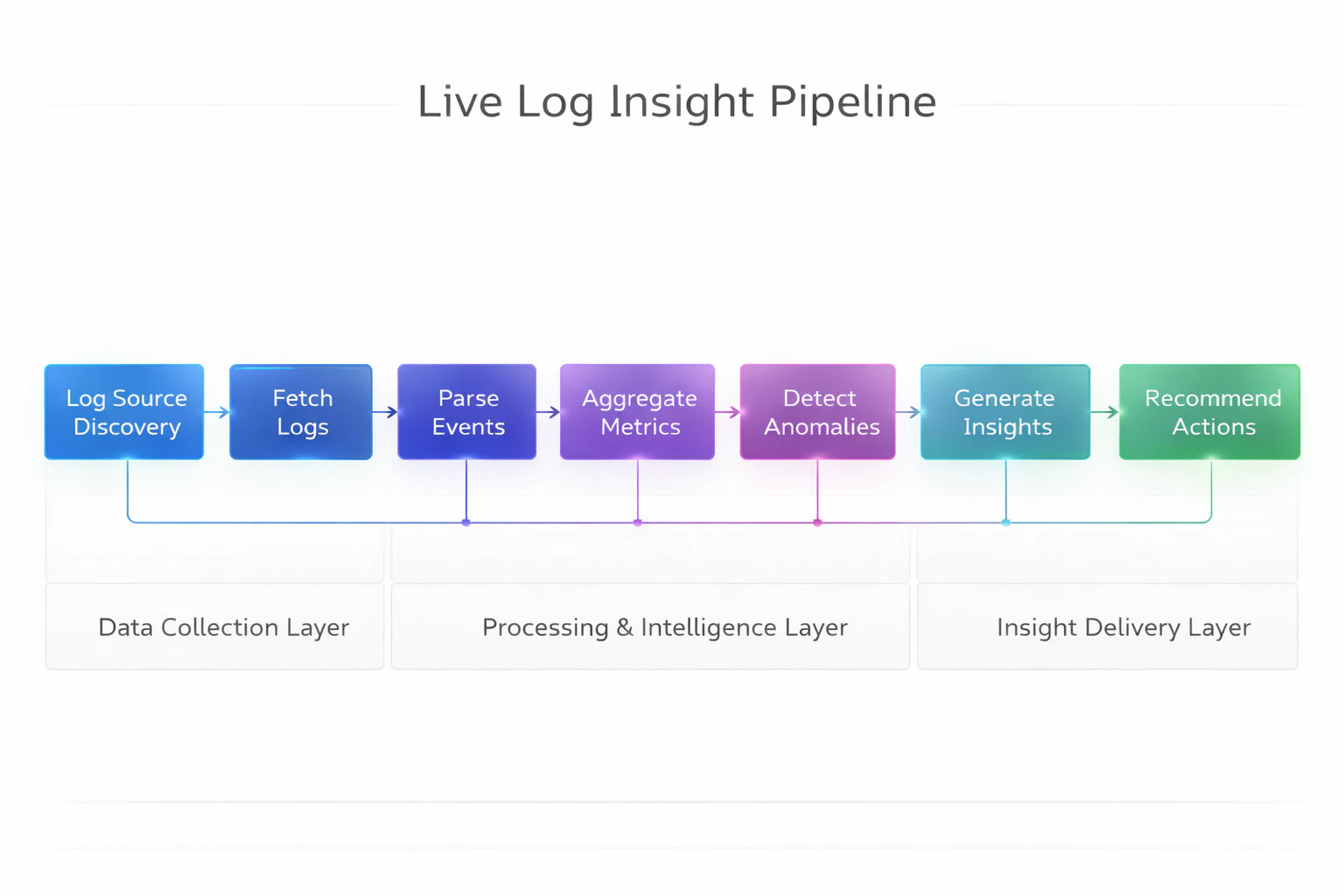
When to Use
Activate Live Log Insight when:- User requests log analysis or system health insights
- Daily/weekly operational summaries are needed
- Investigating incidents, spikes, or unusual behavior
- Monitoring production or staging systems
- Troubleshooting application errors
Quick Example
Interactive CLI Mode
- View system status
- Run log analysis
- Perform quick health checks
- Discover log sources
- Export results
- Run analysis wizard
- And more…
Direct Command Mode
Available CLI Commands
| Command | Description |
|---|---|
status | Show system status and configuration |
analyze | Run the complete log analysis pipeline |
quickcheck | Quick health check |
discover | Discover available log sources |
export | Export results (json/yaml/markdown) |
wizard | Interactive analysis wizard |
verify | Verify installation and dependencies |
demo-prompts | Demonstrate interactive prompts |
- Discover available log sources
- Fetch logs from the specified time range
- Parse and normalize log entries
- Aggregate metrics and patterns
- Detect anomalies
- Generate hypotheses (optional)
- Create a summary report
- Recommend next steps
Supported Log Sources
- Filesystem:
/var/logand custom paths - Elasticsearch: Index-based log retrieval
- Custom sources: Extensible via configuration
Output Formats
| Output | Description | Location |
|---|---|---|
summary.md | Human-readable analysis report | output/summary.md |
anomalies.json | Detected issues with evidence | output/anomalies.json |
recommendations.json | Prioritized action items | output/recommendations.json |
metrics.json | Aggregated statistics | output/metrics.json |
hypotheses.json | Root cause hypotheses | output/hypotheses.json |
Get Started
Quickstart
Get up and running in 5 minutes.
Non-CLI Version
Switch to non-CLI pipeline version.
Core Concepts
Learn about the system architecture.
Skills Reference
Explore all available skills.
Examples
See real-world usage examples.
Configuration
Configure log sources and thresholds.
API Reference
Integrate with your own tools.